The CLI in practice
magus has around thirty subcommands. You reach for maybe six of them daily.
This page groups them by the question you are asking rather than
alphabetically, and covers the behavior that the per-command
reference pages do not.
Before anything else: -o json works on every command that prints
structured output, as do -o yaml, -o name, and
-o template=<go-template>. If you are scripting magus, or you are an agent
reading its output, reach for that first instead of parsing the human format.
The human format is allowed to change; the JSON shape is the contract.
What is in this workspace?
magus ls enumerates the projects magus discovered, with what each declares:
workspace: /Users/you/repo (8 projects)

project: magus
  dir:  /Users/you/repo
  spell: magusfile
  sources: [magusfile.buzz **/*.go go.mod go.sum ...]
  depends_on: [libs/gopherbuzz]
sources and depends_on are the two lines worth reading. They are what the
cache key is derived from and what the affected set walks, so a target
rebuilding when you did not expect it is usually explained here.
magus describe <thing> does two jobs in one command, which is its main
quirk: it defines the concept, then lists every instance.
$ magus describe targets
definition: A target is a named operation (e.g. build, test, lint) declared as
an exported function in a project's magusfile ...

targets (44):
  ci  [canonical - affected/pipeline anchor; composed in the magusfile]
  biome-check  [spell: ts]
  build  [custom - projects: console]
The bracket suffix tells you where each came from: a spell, a custom
magusfile function, or the canonical set. describe accepts spell,
charm, target, graph, project, workspace, module, mcp-tool,
file, and tool (singular or plural).
magus where fuzzy-matches a project and prints its absolute path, bare and
alone, so it composes:
cd "$(magus where console)"
Run something
magus run <target> [projects...] is the workhorse. With no projects it runs
everywhere the target is defined; naming projects narrows it.
magus affected <target> runs only what a VCS diff says changed. It is not a
filter over run: it walks the dependency closure, so a project you did not
touch is included when something it depends on moved.
One thing to know: affected ci errors when no project in scope declares a
ci target. That is deliberate. Ordinary targets fan out and skip projects
that lack them, but ci is the anchor the affected set keys off, so a missing
one would exit 0 having gated nothing.
To fail fast on a cheap check before the expensive part starts anywhere, run
it first and pipe it in. A failed stage stops the stages after it (MGS3030),
and a --plan downstream of one prints no plan:
magus affected generate --no-default-charms | magus affected ci
magus affected generate --no-default-charms | magus affected ci --plan
For a tight loop, pipe the watcher into it:
magus watch | magus affected --stdin build
magus x is the interactive shorthand: pick a project and target from a
picker. It requires a TTY and does not work in a pipeline.
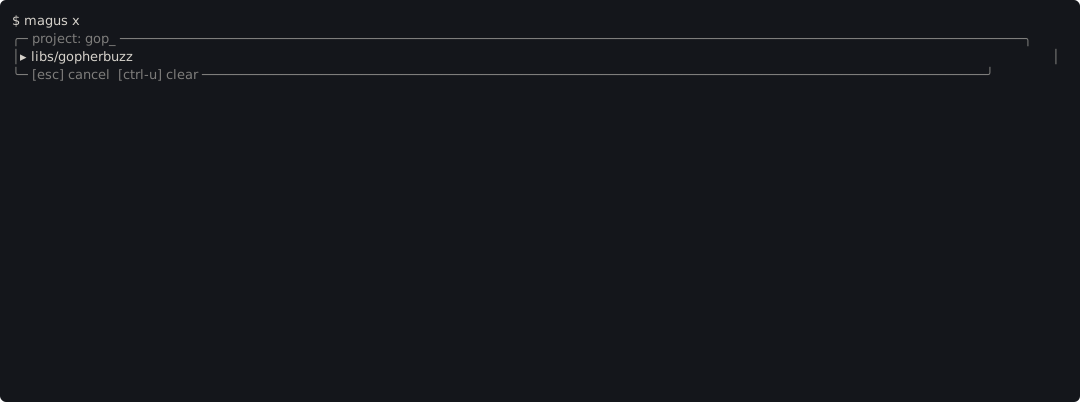
Typing filters, arrow keys and the mouse both move the highlight, and [esc]
cancels. Off a TTY it refuses with a non-zero exit and names the non-interactive
form instead of hanging. See Terminal.
Why did that happen?
Every run prints an output reference, on success and failure alike:
[pass] docs (ran, 1m36s)
  magus run generate:rw docs
out3a777178
summary: 2 cached, 5 ran, 0 failed (1m46s)
magus query output out3a777178 replays exactly what that run printed. A
failure adds the reproduce command and an inspect hint:
[fail] docs generate:rw (ran, 50s)
  cause: magus generate docs: 1 spell(s) failed
  output: out462efb79
  inspect: magus query output out462efb79
  reproduce: magus run generate:rw docs
References are portable: the same inputs mint the same ref on every machine,
so one pasted from CI or a teammate resolves in your checkout once your cache
holds a run of those exact inputs. The inline inspect: hint above is still
suppressed when magus detects CI, but that is about the runner, not the ref:
by the time anyone reads the log, the ephemeral job that printed it is usually
gone, and the failing output is already inline above it. If a ref resolves
nowhere locally, magus query output <ref> sweeps the workspace for a target
whose live cache key predicts it and prints the command that reproduces it. See
output references.
The lines above ([pass] ..., the reproduce command, the ref, the summary:
footer) are the TEXT rendering. magus run <target> -o jsonl reports the
same facts as typed events on the same stream as run.target.result:
run.scope/run.charms/run.cache for the header, run.step per
ctx.needs sub-target, and run.summary for the footer. Nothing free-text
reaches stdout or stderr under -o jsonl: notices, every other log record, and
output printed outside a target are run.notice records on stderr.
For structural questions, the knowledge graph commands answer different shapes of "why":
magus query <term>: search, and show a node's neighborhoodmagus explain <node>: one node: its edges, provenance, blast radiusmagus path <a> <b>: the shortest path between two nodesmagus refs <symbol>: where an ingested code symbol is defined and used, and what calls itmagus graph stats: where the workspace concentrates and where it is neglected
graph stats is the one to run when you have inherited a repository:
graph: 2137 nodes, 4665 edges
connectivity: 2 component(s), largest holds 2136, 0 isolated node(s)

god nodes (most connected):
  DEGREE    IN   OUT  KIND         LABEL
      77    77     0  import       std
      61     2    59  target       content-generate
A high-degree node is a structural risk: everything depends on it, so changing it touches everything. Isolated nodes are the opposite problem: something the builder never linked up.
The insight lenses (hotspots, change affinity, ownership, trend, volatility)
answer the same questions from VCS history instead of structure. They are not
a magus subcommand: the console's Insight page renders all five together,
and an agent reads the same report through the client tool (magus\insight).
Is my setup sane?
magus doctor validates the workspace and is the first thing to run when
something behaves strangely. magus config views and updates configuration;
magus init bootstraps magus.yaml, a starter magusfile, and the VCS merge
driver for generated outputs.
Long-running processes
magus server start backgrounds the server, which keeps the knowledge graph
warm and serves MCP. Starting one when it is already running is a no-op that
still exits 0, so it chains safely in scripts. magus server stop exits
non-zero when it found nothing to stop.
magus status inspects the concurrency pool of a running parent magus: what
is executing, what is queued, and what is waiting on a slot.
Verbosity
Every command honors the same output flags. Which one to reach for, and what
each prints, is covered in
Logging and verbosity. The short version: -v for
"why did this rebuild", -vv when you want to watch the build happen, and
--silent for unattended runs.