Debugging magusfiles
Magus has two entry points into an interactive debugging REPL:
magus buzz: standalone shell with the magusfile loaded.magus\pry():binding.pry-style breakpoint, opens the same REPL mid-target with frame context attached.
Both share the same evaluator. Pry adds stack-introspection commands (.where, .locals, .up/.down, .step, ...) on top of the base REPL. The meta-commands and multiline input sections apply to both unless noted.
Interactive REPL
magus buzz with no arguments opens an interactive Buzz REPL with the same runtime environment available to a magusfile: the magus object (including the host modules and spell bindings) is preloaded. If a magusfile.buzz is present at or above the current directory, it is executed automatically on startup so registered targets and locals are available. There is no flag for this and none is needed: magus reads the workspace from the directory you are in, the same way magus run and magus ls do. Outside a workspace there is nothing to load.
The REPL accepts Buzz expressions and evaluates them against the magusfile runtime. Output is pretty-printed (max depth 3).
// example session
> proc\exec("go", args: ["env", "GOOS"]).stdout
darwin
> proc\which("git")
/usr/bin/git
> fs\basename("docs/guides/debugging.md")
debugging.md
The REPL treats lines starting with // as comments and skips them. Type .help for the meta-command list, .exit (or Ctrl-D) to quit. Ctrl-C clears the current line instead of quitting; pressed while a call such as magus\run(...) is still running, it interrupts that call instead.
--no-autoload
Skip executing the magusfile on start. Useful when you want a blank environment to experiment without side-effects from your project's startup code.
-C <dir>
Set the working directory for import resolution (default: cwd).
magus buzz -C internal/auth
magus\pry(): breakpoint in a magusfile
Call magus\pry() anywhere in a magusfile target to suspend execution and drop into the REPL at that exact point. The REPL inherits the calling Runner's bindings and exposes the surrounding scope.
import "magus";

export fun build(ctx: magus\Context, args: [str]) > void {
    const outputs = ["bin/foo", "bin/bar"];
    proc\exec("go", ["generate", "./..."]);
    magus\pry();   // execution pauses here; inspect or modify state
    proc\exec("go", ["build", "./..."]);
}
magus run build
# *** magus.pry at magusfile.buzz:4 in build
# Type .help for pry commands, .continue (or .exit) to resume.
# pry>
The prompt is pry> at the innermost frame; pry[N]> after .up/.down to frame N.
magus\pry() is a no-op during magus ls and magus describe so it is safe to leave in place during development. Remove it before committing.
Meta-commands
| Command | repl | pry | Notes |
|---|---|---|---|
.help |
✓ | ✓ | Print available commands |
.exit / .quit |
✓ | ✓ | Quit the REPL (or resume execution, for pry) |
.continue |
✓ | Resume execution | |
.load <path> |
✓ | ✓ | Execute a file in the current session |
.history [N] |
✓ | ✓ | Show the last N (default 50) commands across sessions |
.history!N |
✓ | ✓ | Print the Nth-most-recent command for copy-paste |
.whereami |
✓ | Print source lines surrounding the call site | |
.where / .backtrace |
✓ | Print the call stack | |
.up / .down |
✓ | Move the inspected frame up or down | |
.locals |
✓ | List variables in scope of the selected frame | |
.globals |
✓ | List user-defined globals (host bindings filtered out) | |
.pp <expr> |
✓ | Evaluate <expr> and pretty-print the result |
|
.step |
✓ | Single-step into the next line | |
.next |
✓ | Step over the current line | |
.finish |
✓ | Run until the current frame returns |
History is persisted at $XDG_STATE_HOME/magus/pry_history (or ~/.local/state/magus/pry_history) and shared between the standalone magus buzz REPL and pry, so either one recalls what the other left behind.
Color output is enabled when stdout is a TTY; set NO_COLOR=1 to disable. The continuation prompt (>> / pry>>) is green-tinted on color terminals.
Multiline input
The REPL detects incomplete input and reprompts with >> until the expression closes: it reinvokes the Buzz parser on each newline, treats anything that does not yet parse to a complete statement as incomplete, and surfaces type errors immediately.
Acting on a failed run
When a run ends with failures they stay pinned on screen rather than scrolling away, next to the captured output that explains them:
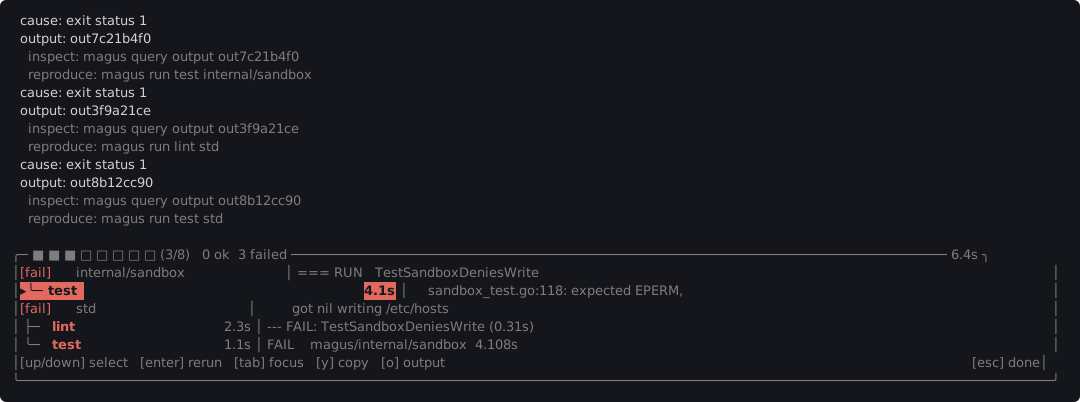
Select a failure and enter reruns just that target with --step below,
o prints its captured output into the transcript, and y copies it. See
Terminal for everything else it draws.
--step
Pause before every subprocess and prompt for a keystroke. Concurrency is forced to 1 so commands execute one at a time.
magus run build --step
magus affected build --step
At each pause, magus prints the command and working directory, then waits:
→ go build ./...  (cwd: /workspace/api)
  [s]tep  [c]ontinue  s[k]ip  [r]epl  [a]bort:
| Key | Action |
|---|---|
s / Enter |
Execute this command, then pause again before the next |
c |
Execute this command and stop pausing (run the rest normally) |
k |
Skip this command without executing it |
r |
Open a REPL in the current context, then re-prompt |
a / q / Ctrl-C |
Abort the run |